
What Is a Progressive Web App? A Beginner’s Guide for Business Owners

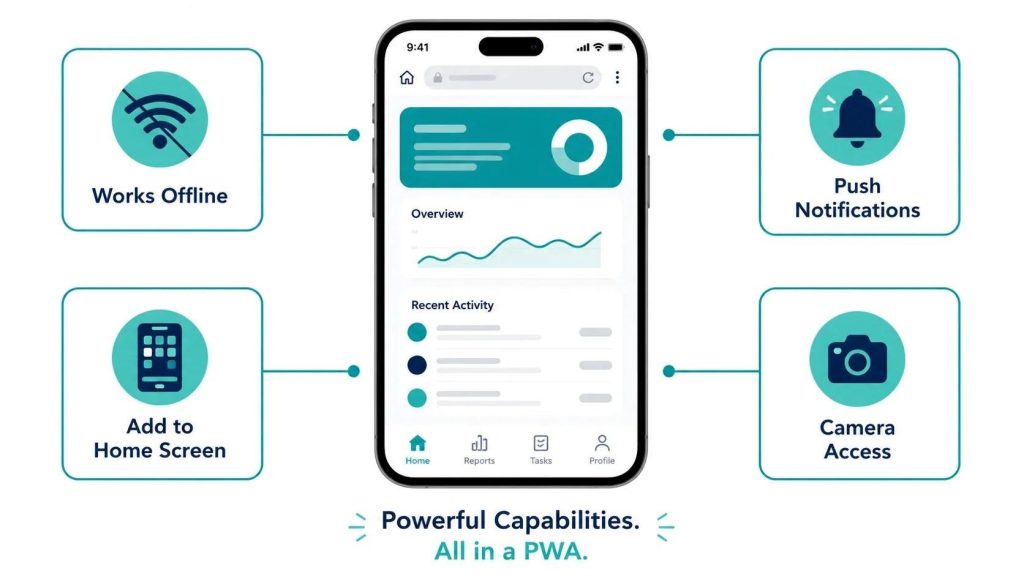
A Progressive Web App (PWA) is a website that behaves like a native mobile app. It can be installed on a phone’s home screen, works offline, sends push notifications, and loads fast on slow connections. PWAs are built with standard web technologies (HTML, CSS, JavaScript) and run in a browser rather than through an app store. They are cheaper to build than native apps, work on both iOS and Android from a single codebase, and require no App Store submission. The trade-off is limited access to device hardware and, on iOS, reduced feature support compared to Android.
The line between a website and a mobile app has been blurring for years. Progressive Web Apps sit at that intersection. They look and behave like apps, but they are built and deployed like websites.
Understanding what a PWA is and what it is not helps you make a better decision when evaluating whether your product needs a native mobile app, a PWA, or a well-optimized mobile website. The answer is not the same for every business.
What Makes a Web App ‘Progressive’?
The term comes from a design philosophy: the app progressively enhances its capabilities based on what the user’s device and browser support. A user on a modern Chrome browser on Android gets the full PWA experience. A user on an older browser gets a functional website. The experience scales up with capability rather than failing for unsupported devices.
Technically, a PWA is defined by three components working together:
- HTTPS: The app must be served over a secure connection. This is the baseline requirement for all modern web security and a prerequisite for the features below.
- Service Worker: A JavaScript file that runs in the background, separate from the main browser thread. It intercepts network requests, manages caching, enables offline functionality, and powers background sync and push notifications.
- Web App Manifest: A JSON file that tells the browser how the app should behave when installed: its name, icons, theme color, display mode (fullscreen, standalone, or browser), and start URL.
When all three are in place and meet Google’s criteria, Chrome on Android will offer users an ‘Add to Home Screen’ prompt automatically. On iOS, users can manually add PWAs to their home screen through Safari’s share menu, though the prompt is not automatic.
What Can a Progressive Web App Do That a Regular Website Cannot?
PWAs unlock a set of capabilities that standard websites cannot access without specific browser permissions and API support. Here is what becomes possible.
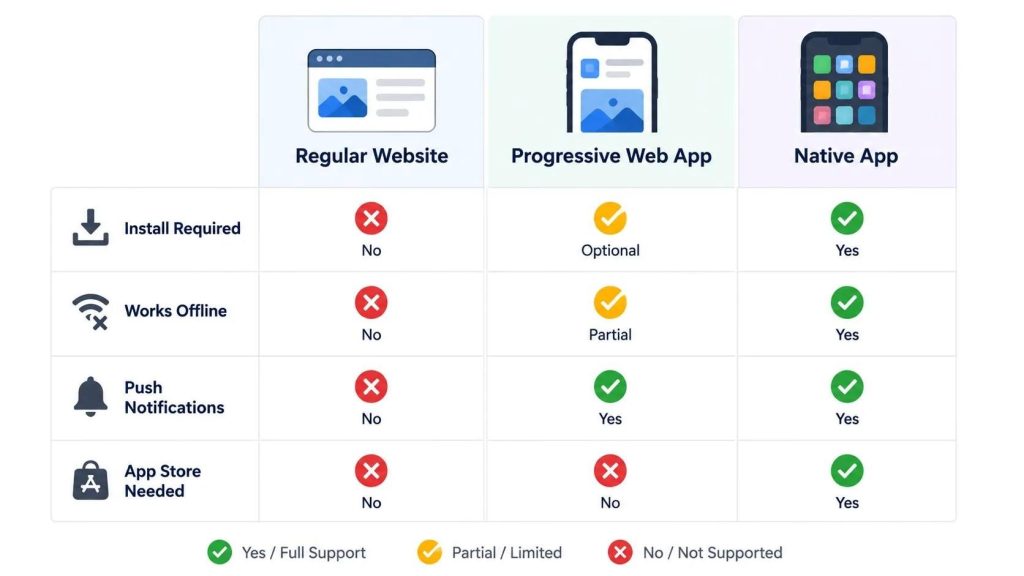
| Capability | PWA | Standard Website | Native App |
|---|---|---|---|
| Works offline or on poor connections | Yes (via service worker caching) | No | Yes |
| Installable to home screen | Yes (no app store required) | No | Yes (via app store) |
| Push notifications | Yes on Android; limited on iOS 16.4+ | No | Yes |
| Background sync | Yes | No | Yes |
| Fast load on repeat visits | Yes (cached assets) | Slower (no persistent cache) | Yes |
| Access to device camera | Yes (via browser API) | Yes | Yes (native, more reliable) |
| Access to GPS/location | Yes (via browser API) | Yes with permission | Yes (native, more reliable) |
| Bluetooth / NFC access | Limited (Chrome only) | No | Yes |
| Face ID / biometric auth | No on iOS; limited on Android | No | Yes |
| App Store presence | No (not listed in app stores) | No | Yes |
| Automatic OS-level updates | Yes (updated when you deploy) | Yes | Requires user to update |
The capabilities column for PWA reflects the current state in 2026. Browser support for web APIs has expanded significantly in recent years, particularly on Android Chrome. iOS support through Safari has improved with iOS 16.4 but remains behind Android Chrome in several areas, most notably push notifications and background processing.
How Does a PWA Compare to a Native Mobile App?
This is the core question for most businesses evaluating their options. The honest answer is that it depends on what your app needs to do.
| Factor | PWA | Native App (iOS / Android) |
|---|---|---|
| Build cost | Lower — one codebase for all platforms | Higher — separate iOS and Android builds (or cross-platform framework) |
| Time to launch | Faster — no app store review required | Slower — App Store review adds 1-3 days minimum; rejections add more |
| Distribution | Share a URL; no download required | Users must find and install from App Store or Google Play |
| Discoverability | Indexed by Google; searchable | App store search + web indexing of app pages |
| Device hardware access | Moderate; camera, GPS, microphone via browser APIs | Full — camera, biometrics, Bluetooth, NFC, background processes |
| Offline functionality | Good for content caching; limited for complex data operations | Full offline capability with local database |
| Push notifications | Full on Android Chrome; iOS 16.4+ Safari (user must add to home screen first) | Full on both platforms |
| Performance (animation-heavy) | Good but below native for high frame-rate or GPU-intensive experiences | Best possible performance on device hardware |
| Maintenance | Single codebase; updates deploy instantly without user action | Two codebases; users must update; App Store review required |
| App store presence | Not in app stores — a limitation for discoverability in some markets | Full app store listing with ratings, screenshots, reviews |
The clearest cases for a PWA over a native app: content-driven products, productivity tools, e-commerce experiences, and internal business tools where web development skills are more accessible than native mobile expertise. The clearest cases for native: apps requiring deep device hardware access, high-performance gaming or AR experiences, or products where App Store presence and discoverability are central to the acquisition strategy.
What Types of Businesses Should Consider Building a PWA?
PWAs are not the right choice for every product, but they are the right choice for more products than most businesses realize.
E-Commerce Businesses
PWAs have a strong track record in e-commerce. Flipkart’s PWA (Flipkart Lite) reduced data usage by 3x and tripled time-on-site. Alibaba’s PWA increased conversions by 76% on iOS and 14% on Android. The fast-loading, installable, offline-capable nature of PWAs suits repeat-purchase e-commerce better than a standard mobile website and at a fraction of the cost of a native app.
Media and Content Publishers
News sites, blogs, and content platforms benefit significantly from PWA capabilities: instant loading of cached content, offline reading, and push notifications for breaking news or new content alerts. The Washington Post rebuilt its mobile web experience as a PWA and achieved a 23% increase in mobile search visits. Content businesses that need to deliver fast experiences on variable connections are natural PWA candidates.
B2B and Internal Tools
Enterprise businesses building internal tools, dashboards, or field service applications often choose PWAs to avoid app store overhead and the complexity of managing app deployments across corporate device fleets. A PWA can be deployed as a URL, pinned to a home screen by IT policy, and updated centrally without requiring individual device updates.
Startups Validating a Product
For a startup that needs to get a product in front of users quickly to validate an idea before investing in native development, a PWA offers the fastest path to a real, installable product experience. Validate the core value proposition as a PWA, then build the native app when you have revenue and user data to justify the investment. This is a direct complement to the iOS-first, Android-later strategy many startups use.
What Are the Limitations of Progressive Web Apps?
PWAs have real limitations that matter for certain product types. Being clear about these prevents building the wrong thing.
iOS Restrictions
Apple has historically been slower to support PWA capabilities in Safari, the only browser engine allowed on iOS (all iOS browsers including Chrome use WebKit underneath). Push notifications on iOS require the user to add the PWA to their home screen first, and several background processing APIs available on Android Chrome are not supported on iOS Safari. For products where the iOS user experience is critical, these gaps require specific design accommodations or argue for native development.
No App Store Presence
A PWA cannot be listed in the Apple App Store or Google Play Store. For products where app store discovery is a significant acquisition channel, that is a meaningful limitation. App store search, featured placements, editorial coverage, and ratings are not available to PWAs. Some businesses ship both a PWA and a native wrapper (a ‘shell’ native app that loads the PWA) to gain app store presence while maintaining a single web codebase, though Apple has become stricter about approving thin wrapper apps.
Hardware Access Ceiling
Products requiring Bluetooth, NFC, advanced biometrics, real-time background processing, or AR/VR capabilities need native development. The browser API surface has expanded but has a ceiling that native apps do not. If your product’s core experience depends on any of these capabilities, a PWA is not the right choice regardless of cost savings. Consult the UI/UX design requirements for your product before committing to either approach.
How Much Does a Progressive Web App Cost to Build?
A PWA is built with web technologies, which means the development cost is closer to a web development project than a native app project. A basic PWA with offline capability, home screen installation, and push notifications typically costs $8,000-$25,000. A full-featured PWA with complex data management, real-time features, and a polished app-like UX runs $25,000-$60,000.
For comparison, a native iOS app with equivalent functionality costs $20,000-$60,000, and building both iOS and Android natively costs 60-80% more than a single platform. The PWA cost advantage is most significant when you need to reach both iOS and Android users and the hardware limitations are not a blocker.
Frequently Asked Questions
Do PWAs appear in search results like regular websites?
Yes. Because PWAs are built on web technologies and served over HTTPS, Google crawls and indexes them like any other website. This is a significant advantage over native apps, which are not directly indexable by search engines. A well-optimized PWA can rank in Google search results and drive organic traffic in the same way a traditional website does, while also offering an app-like experience to users who install it.
Can a PWA send push notifications to iPhone users?
Yes, as of iOS 16.4 (released March 2023), but with conditions. The user must first add the PWA to their home screen through Safari’s share menu. Only then can the PWA request permission to send push notifications. Notifications sent to iOS PWAs currently do not appear in the iOS notification center the same way native app notifications do, and there are rate limits on delivery. Android Chrome has supported full PWA push notifications for several years without these restrictions.
Is a PWA faster than a native app?
Generally no for raw performance, but the difference is often negligible for most business applications. Native apps have direct access to device hardware and can use platform-specific rendering optimizations unavailable to web apps. PWAs running in a browser have an additional abstraction layer. For content browsing, e-commerce, forms, and standard business workflows, a well-built PWA is fast enough that users cannot distinguish the experience from a native app. For graphics-intensive experiences, real-time multiplayer games, or AR features, native wins by a clear margin.
What is the difference between a PWA and a hybrid app?
A hybrid app is a native app shell that loads web content inside it, typically using a WebView component. Tools like Capacitor and Cordova enable hybrid app development. A PWA runs directly in a browser and does not require a native shell. Hybrid apps can be listed in app stores (unlike PWAs) and have slightly better device API access than PWAs, but they require app store submission and review. PWAs update instantly; hybrid apps require a new store submission for each update.
Should I build a PWA or a native app for my business?
Build a PWA if: your budget is limited, you need to reach both iOS and Android users quickly, your app is content or transaction-focused, and your product does not require deep hardware access. Build a native app if: App Store discoverability is central to your acquisition strategy, your product requires Bluetooth, NFC, biometrics, or AR, your users need full offline functionality with complex data, or your target iOS audience would be significantly limited by Safari PWA restrictions. When genuinely unsure, a PWA MVP followed by native development after validation is a pragmatic path.
Progressive Web Apps occupy a genuinely useful middle ground between a mobile-optimized website and a full native app. For the right use case, they deliver most of the user experience benefits of a native app at a fraction of the cost, with the added benefit of web-native discoverability through search.
The decision comes down to your product’s specific requirements, your target platform mix, and whether the iOS PWA limitations affect your core use case. Get those three inputs right and the PWA vs native decision becomes straightforward.
If you are working out which approach fits your product, talk to TruTransit Solutions. We build both PWAs and native apps and will recommend the approach that matches your goals and budget, not the one that maximizes the project size.