

10 Website Mistakes Small Businesses Keep Making (and How to Fix Them)

The most damaging website mistakes small businesses make are: no clear call to action on the homepage, a site that loads slowly on mobile, missing or inconsistent contact information, no Google Business Profile connection, no SEO basics in place, outdated content, poor mobile layout, no SSL certificate, missing analytics tracking, and stock photography that undercuts trust. Most of these are fixable in a day or less. A few require a proper rebuild.
Most small business website problems are not dramatic. The site is not broken. It just does not work very well. Pages load a little slowly. The phone number is buried in the footer. The “About” page still says 2019. The contact form goes to an email address nobody checks.
These are the kinds of problems that do not announce themselves. They just quietly cost you leads, month after month. Here are the ten most common ones, and what to do about each.
Mistake 1: No Clear Call to Action on the Homepage
A visitor lands on your homepage. They read a few lines. They are interested. Then they look for what to do next and nothing is obvious.
The homepage has one job: tell the visitor what you do and give them a clear next step. That next step is your call to action: a phone number, a booking button, a contact form link, a quote request. One primary action, visible without scrolling.
The fix: audit your homepage right now. Is there one primary CTA above the fold? Is it specific (“Book a Free Consultation”) rather than generic (“Learn More”)? If not, that is a web design change that can be made in an afternoon and will affect your conversion rate immediately.
Mistake 2: The Site Loads Too Slowly on Mobile
Google uses page speed as a ranking signal. More importantly, real users abandon pages that take more than three seconds to load on mobile. Most small business websites load in five to eight seconds on a mid-range phone. That gap costs rankings and visitors simultaneously.
The most common causes: uncompressed images, too many third-party scripts, cheap shared hosting, and no caching layer in place.
The fix: run your site through Google PageSpeed Insights (free). It will show you exactly what is slowing the page down. Image compression alone fixes the problem on most small business sites. If the score is below 50 on mobile and the issues are architectural, a web development review is worth the cost of the remediation work.
Mistake 3: Contact Information Is Hard to Find
Local customers, especially older demographics, want to call you. They want your address when they are trying to find you. They want your hours when they are deciding whether to stop by.
If any of that information requires more than one click to find, you are creating friction that costs you customers. Phone number, address, hours, and a contact form should all be visible on every page, not just the contact page.
The fix: add your phone number to the site header. Put your address and hours in the footer. Make sure they match exactly what is listed on your Google Business Profile. Inconsistent NAP (name, address, phone) data across your site and directory listings hurts local SEO.
Mistake 4: No SSL Certificate (Your Site Says ‘Not Secure’)
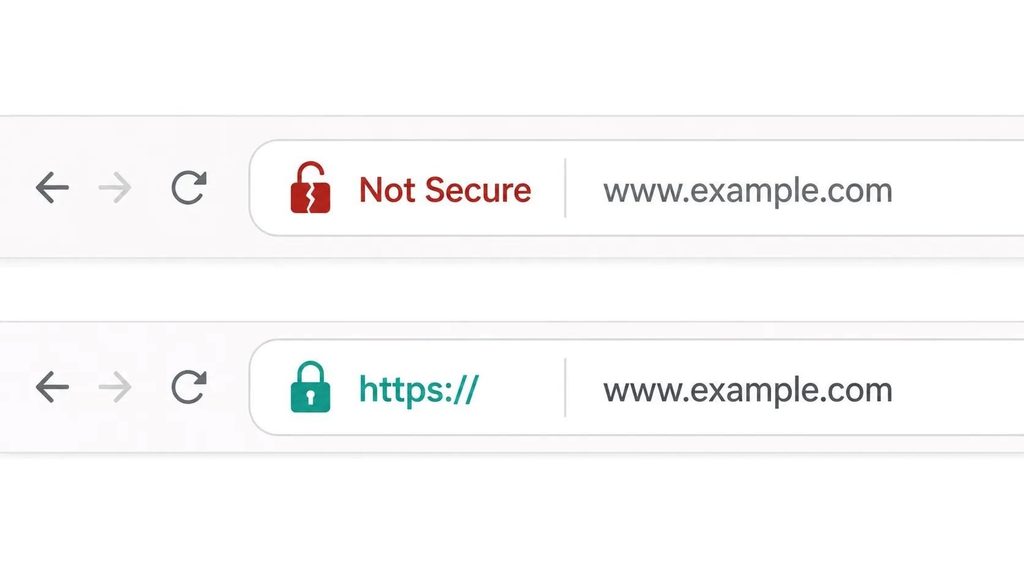
If your site URL starts with http:// instead of https://, Chrome and other browsers flag it as not secure. Some visitors see an explicit warning before the page loads. This is a trust problem that costs you more traffic than most business owners realize.
SSL certificates encrypt data between the browser and your server. They are free through Let’s Encrypt and included with virtually all modern hosting plans. There is no reason a small business site should be running without one.
The fix: contact your hosting provider. In most cases, enabling SSL takes less than ten minutes and requires no technical knowledge on your end. If your host does not offer free SSL, switch hosts.
Mistake 5: No SEO Basics in Place
Most small business sites have no title tags beyond the default (usually the business name repeated on every page), no meta descriptions, and heading structures that Google cannot make sense of. Basic on-page SEO does not require a full campaign. It requires setting the fundamentals correctly once.
What the basics look like:
- Every page has a unique title tag (50-60 characters) that includes a keyword and your location where relevant
- Every page has a meta description (140-160 characters) that earns the click
- The H1 heading on each page clearly states what the page is about
- Your business name, address, and phone number appear consistently in text (not just as an image)
- A sitemap has been submitted to Google Search Console
The fix: install Yoast SEO if you are on WordPress. It walks you through the basics for every page. If you are on a different platform or want someone to handle this properly, an SEO audit and implementation takes a few hours for a standard small business site.
Mistake 6: The Site Is Not Mobile-Responsive
Over 60% of web traffic globally comes from mobile devices (Statista, 2025). A site that is not designed to adapt to a phone screen forces mobile visitors to pinch, zoom, and scroll sideways. Most of them leave instead.
Mobile-responsive does not mean “it kind of works on a phone.” It means the layout, font sizes, button targets, and navigation all work correctly on a 390px-wide screen without any user accommodation required.
The fix: pull up your site on your own phone right now. Can you read the text without zooming? Are the buttons easy to tap? Does the menu work? If not, this is a web design issue that typically requires a proper rebuild rather than a patch. A non-responsive site is one of the clearest signals that it is time to start fresh.
Mistake 7: Stock Photography That Looks Like Stock Photography

Visitors can tell. Generic handshake photos, staged team meetings with people who are obviously not your team, and diversity stock images that do not match your actual business all undercut credibility in a way that is hard to articulate but easy to feel.
Real photos of your actual location, team, products, or work consistently outperform stock photography on conversion rate. This is one of the most cost-effective improvements a local business can make.
The fix: hire a local photographer for a half-day shoot. For most small businesses, two to four hours of photography time produces enough images for the entire site and social media for the next year. If budget is tight, a modern smartphone on a bright day with decent composition beats most stock photography for authenticity. If you are also thinking about brand identity more broadly, photography is a core part of that system.
Mistake 8: Outdated Content That Signals Neglect
A copyright footer that says 2019. A blog section with three posts, the last one from three years ago. A team page with photos of people who no longer work there. An “upcoming events” section with events from 2022.
Any of these signals to a visitor that the business is either not paying attention or, worse, no longer operating. It is a trust problem that costs leads quietly.
The fix: do a content audit once a year. Update the copyright year. Remove or update stale sections. If you have a blog, either publish consistently or remove the blog entirely rather than leaving a graveyard of old posts as the first thing visitors see.
Mistake 9: No Google Analytics or Search Console Connected
If you do not know how many people visit your site, where they come from, which pages they visit, and what they do before leaving, you cannot make informed decisions about what to fix or what to invest in.
Google Analytics and Google Search Console are both free. Search Console shows you which keywords your site appears for in Google, which pages get clicks, and whether Google has any technical issues crawling your site. Analytics shows you visitor behavior once they arrive. Together, they are the minimum viable tracking setup for any business that takes its digital marketing seriously.
The fix: connect both tools today. Both require adding a small piece of code to your site or installing a plugin on WordPress. If you have a developer or agency managing your site, ask them to confirm both are connected and reporting data correctly.
Mistake 10: The Site Has No Connection to Your Google Business Profile
Your Google Business Profile (GBP) is often the first thing a local customer sees when they search for your business or your service category. If the website URL on your GBP points to an outdated site, a different domain, or does not match the NAP data on your site, Google’s confidence in your local relevance drops.
The fix: log into your Google Business Profile and confirm the website URL is current and correct. Then confirm that your business name, address, and phone number on the site exactly match what is on the GBP listing. Even minor formatting differences (“St.” vs “Street”, “Suite” vs “Ste”) can create inconsistency signals. This is one of the fastest local SEO wins available to any small business.
Quick Reference: All 10 Mistakes and Their Fixes
| Mistake | Impact | Effort to Fix |
|---|---|---|
| No clear CTA on homepage | Loses leads who are ready to act | Low — a design and copy change |
| Slow mobile load speed | Loses rankings and abandons traffic | Medium — image compression, caching, possibly hosting change |
| Contact info hard to find | Loses phone and walk-in customers | Low — header and footer edit |
| No SSL certificate (http://) | Triggers browser warnings; kills trust | Low — hosting provider can enable in minutes |
| No basic on-page SEO | Site invisible in search for relevant terms | Medium — title tags, meta, H1s, sitemap |
| Not mobile-responsive | Loses 60%+ of mobile visitors | High — usually requires a rebuild |
| Generic stock photography | Undermines credibility and local trust | Medium — half-day photography shoot |
| Outdated content | Signals neglect; erodes visitor confidence | Low — annual content audit |
| No analytics or Search Console | Cannot measure or improve performance | Low — free tools, quick to install |
| GBP not connected or mismatched | Hurts local search visibility | Low — a 15-minute check and edit |
Frequently Asked Questions
How do I know if my small business website is performing well?
Connect Google Analytics and Search Console if you have not already. Look for: monthly organic sessions (are they growing?), average page load time on mobile (under 3 seconds is the target), and the number of contact form submissions or calls attributable to website traffic. If you have none of this data, that is the first thing to fix — you cannot improve what you are not measuring.
Should I fix these issues myself or hire someone?
Depends on the issue. SSL, contact information, analytics setup, and GBP connection are all DIY-friendly with basic technical confidence. SEO setup, speed optimization, and mobile responsiveness often produce better and faster results with professional help, especially if the underlying site architecture is the root cause. Trying to patch a non-responsive site without rebuilding it usually wastes more time than starting clean.
How much does it cost to fix a small business website?
Minor fixes (SEO basics, analytics, contact info, SSL) cost nothing if you do them yourself or $200-$500 if you hire someone for a few hours. A mobile responsiveness fix or speed optimization project typically costs $500-$2,000. A full rebuild because the site is fundamentally broken costs $3,000-$7,000 for a professional small business site. The audit that tells you which category your site falls into is often free or low-cost.
What is the biggest website mistake that actually costs money?
A site that is not mobile-responsive and loads slowly costs the most in real terms: lost search rankings, lost traffic, and lost leads from the majority of visitors who now browse on phones. It is also the most invisible problem because the business owner typically looks at the site on a desktop. Check your site on a mid-range Android phone on a cellular connection, not on your work laptop on a fast office network. That is what most of your customers experience.
How often should a small business update its website?
Content should be reviewed annually at minimum. SEO performance and Core Web Vitals should be checked quarterly. The design and platform typically need attention every 3-5 years. The trigger for a full refresh is usually: the site underperforms consistently on mobile, the CMS is difficult to use, or the design no longer reflects what the business has become. Incremental updates handled regularly cost less than emergency rebuilds.
None of the mistakes on this list are unusual. Most small business sites have three to five of them right now. The good news is that most are fixable without a full rebuild, and the ones that do require a rebuild tend to be the same ones that are quietly costing the most in lost traffic.
Start with the quick wins: SSL, analytics, contact info, GBP alignment. Then tackle the harder ones: speed, mobile layout, SEO basics. Each fix compounds the others.
If you want someone to audit your site and tell you exactly which issues apply and what fixing them would cost, get in touch with TruTransit Solutions. We run straightforward audits and give you a prioritized list, not a sales pitch.