
iOS vs Android App Development: Which Platform to Launch on First?

For most startups and new apps targeting US or European markets, iOS first is the stronger choice. iOS users in these markets have higher average purchase intent, the App Store has a lower cost-per-acquisition on average, and Apple’s stricter review process produces a more consistent baseline quality. Android first makes more sense for global markets, enterprise apps with Android-heavy device policies, or products targeting younger or budget-conscious demographics. Building for both simultaneously costs 60-80% more than a single platform and is rarely the right starting point.
Every founder building a mobile app faces this decision early. The choice feels high-stakes because it shapes the first six months of development, and switching platforms mid-build is expensive.
The good news is that the decision has a framework. It comes down to your target user, your market geography, your monetization model, and your development budget. Get those four inputs right and the platform choice follows naturally.
This guide covers each factor in detail. If you are also working out the broader scope and cost of your mobile app development project, the platform decision feeds directly into the budget conversation.
What Is the Market Share Difference Between iOS and Android?
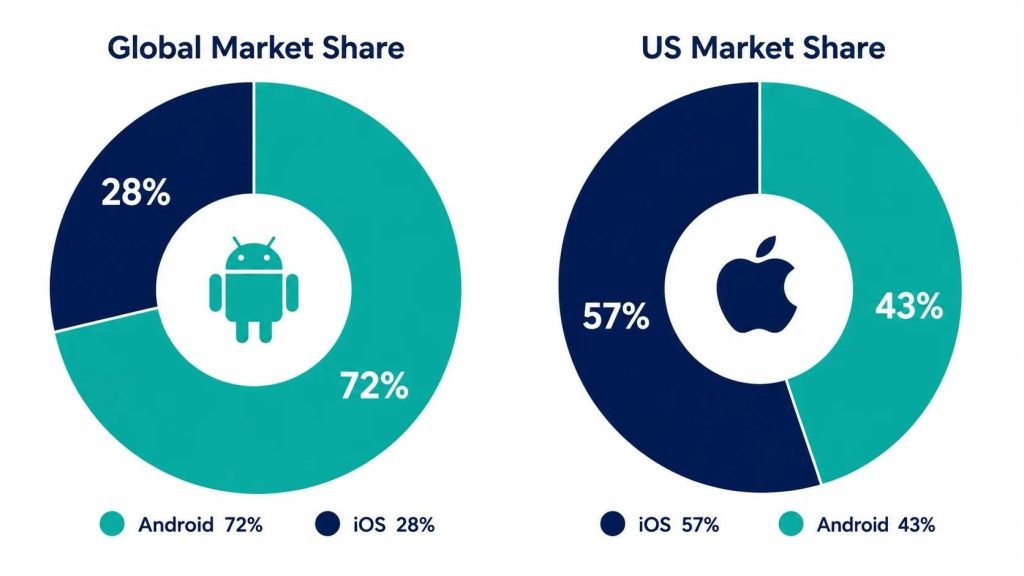
Global Android market share is approximately 72% versus 27% for iOS (StatCounter, 2025). That number surprises most founders who assume iOS dominates. The reality is that Android dominates globally but the picture reverses in specific high-value markets.
| Market / Segment | iOS Share | Android Share | Implication |
|---|---|---|---|
| United States | ~57% | ~43% | iOS majority; strong first choice for US-focused consumer apps |
| United Kingdom | ~52% | ~48% | iOS slight majority; similar to US pattern |
| Western Europe (avg) | ~34% | ~65% | Android majority; consider Android-first or simultaneous |
| India | ~5% | ~95% | Android strongly dominant; iOS-first rarely makes sense here |
| Southeast Asia | ~15% | ~84% | Android dominant; budget device market |
| Japan | ~67% | ~33% | iOS dominant; one of the few Asian markets where iOS leads |
| Enterprise (US) | ~72% of device deployments | ~28% | iPhone is the default corporate device in most US companies |
| Age 18-24 (US) | ~85% iPhone ownership | ~15% | Younger US demographics skew heavily iOS |
The most important number is not global market share. It is the platform breakdown of your specific target user in your specific geography. A US consumer app targeting professionals ages 25-45 is building for a predominantly iOS audience. A utility app targeting emerging markets is building for Android.
How Does Monetization Strategy Affect the Platform Choice?
Platform affects revenue in ways that go beyond market share. iOS and Android users behave differently when it comes to spending money inside apps, and that difference can be decisive for apps with in-app purchase or subscription monetization.
In-App Purchases and Subscriptions
Apple App Store consistently generates higher revenue per user than Google Play despite lower global install volume. According to data from Sensor Tower (2024), App Store consumer spend was approximately $90 billion compared to $47 billion on Google Play. That gap exists even though Android has nearly three times the global install base.
The practical implication: for apps monetized through subscriptions, premium upgrades, or in-app purchases, iOS users are more likely to convert and spend more when they do. For a subscription-first business model, iOS is the higher-revenue platform per user.
Advertising-Based Monetization
Apps monetized through advertising see a narrower revenue gap between platforms. Advertiser CPMs are higher on iOS due to Apple’s App Tracking Transparency framework. For e-commerce apps specifically, iOS users show higher average order values and conversion rates, making iOS the stronger revenue platform regardless of monetization model.
Free Apps with No Monetization
If your app is free with no current monetization model and you are primarily focused on user acquisition and engagement metrics, platform choice matters less for revenue and more for your target demographic and the feedback quality you want from early users. iOS users tend to leave more detailed App Store reviews; Android users tend to install more freely and churn more readily.
How Does Development Cost Differ Between iOS and Android?
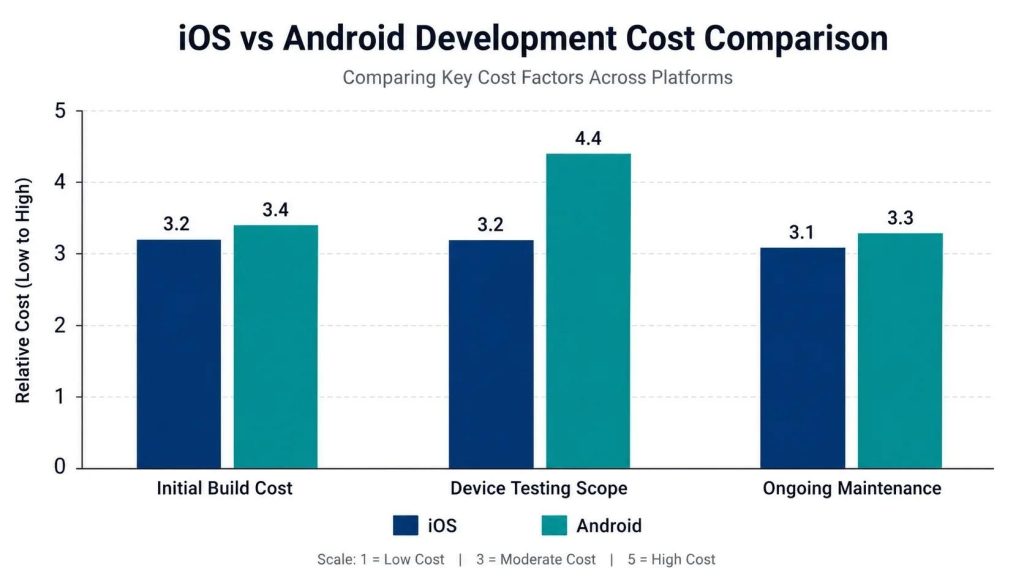
A native iOS app and a native Android app are separate codebases. Building both simultaneously roughly doubles the development cost relative to a single platform. For a project that would cost $40,000 on iOS alone, building both natively typically runs $65,000-$80,000. This is why most startups do not build for both platforms from the start, and why cross-platform frameworks like React Native and Flutter are popular for budget-conscious first builds.
| Build Approach | Relative Cost | Time to Launch | Code Reuse | Best For |
|---|---|---|---|---|
| iOS native only (Swift) | Baseline | Shortest | None | US/JP consumer apps; subscription monetization |
| Android native only (Kotlin) | Similar to iOS | Shortest | None | Global markets; enterprise Android fleets |
| Cross-platform (React Native / Flutter) | 20-40% less than two native builds | Medium | 70-90% | Budget-conscious; need both platforms; business apps |
| Both native simultaneously | 60-80% more than single platform | Longest | None | Well-funded; platform-specific UX is critical |
| iOS first, Android later | Spread over time | iOS fastest | Some design assets | Most recommended startup approach |
The iOS-first, Android-later approach is the most common path for funded startups. You validate the product with an iOS launch, use App Store revenue and user feedback to refine the experience, then build the Android version with a proven feature set and a real revenue baseline.
What Are the Technical Differences Between iOS and Android Development?
Each platform has its own development language, tooling, and design guidelines. Understanding these differences helps you evaluate timelines and web and app development agency proposals accurately.
iOS Development (Swift / Xcode)
iOS apps are built in Swift (or the older Objective-C) using Apple’s Xcode IDE. Apple’s Human Interface Guidelines define how apps should look and behave, and the App Store review team enforces them during the review process. Apple’s review takes 1-3 days on average for new submissions.
- Language: Swift (primary), Objective-C (legacy)
- IDE: Xcode (Mac only — iOS development requires a Mac)
- Design guidelines: Apple Human Interface Guidelines (HIG)
- Testing: Requires physical device or Xcode simulator; TestFlight for beta distribution
- App Store review: 1-3 days average; stricter guidelines mean higher rejection rate for first submissions. Getting UI/UX design right before development significantly reduces rejection risk.
Android Development (Kotlin / Android Studio)
Android apps are built in Kotlin (or the older Java) using Android Studio, which runs on Mac, Windows, or Linux. Google’s Material Design guidelines define the Android design language. Google Play review is automated for most apps and typically completes within hours.
- Language: Kotlin (primary), Java (legacy)
- IDE: Android Studio (available on Mac, Windows, Linux)
- Design guidelines: Google Material Design 3
- Testing: More complex due to device fragmentation; hundreds of screen sizes and OS versions to account for
- Google Play review: Hours to 1 day for most apps; less strict than Apple but malware screening has tightened
Device Fragmentation: Android’s Extra Complexity
Android runs on devices from dozens of manufacturers across a wide range of screen sizes, processor types, and OS versions. Samsung, Google Pixel, OnePlus, Motorola, and hundreds of other manufacturers all run Android with varying customizations.
iOS runs on a controlled set of Apple hardware with consistent screen sizes and OS adoption rates. Apple users upgrade iOS rapidly: typically 80%+ of active devices are on the current major iOS version within a year. Android fragmentation means many users run OS versions that are 2-4 years old, which requires broader compatibility testing. This is one reason Android development and QA testing often takes more time and cost than iOS for equivalent feature sets.
What Does the App Review and Launch Process Look Like on Each Platform?
| Step | Apple App Store | Google Play Store |
|---|---|---|
| Developer account cost | $99/year | $25 one-time |
| Account setup time | 1-2 days (identity verification required) | Hours to 1 day |
| App review time (new apps) | 1-3 days average | Hours to 1 day (automated + manual for flagged apps) |
| Rejection rate | Higher; Apple enforces design and policy guidelines strictly | Lower for initial submission; more post-launch takedowns |
| Beta testing | TestFlight (up to 10,000 testers) | Google Play internal/closed/open testing tracks |
| Update review time | 1-3 days | Hours to 1 day |
| Revenue share | 15% for small developers (<$1M); 30% above threshold | 15% for small developers (<$1M); 30% above threshold |
Apple’s stricter review process has a practical upside: it filters out lower-quality apps, which means the App Store has a higher baseline quality bar than Google Play. First-time app submissions to the App Store are rejected roughly 40% of the time for policy or design issues. Build time for a first submission should account for at least one rejection and resubmission cycle.
Which Platform Should You Choose? A Decision Framework
Run through these questions in order. The answers will give you a clear starting point.
| Question | iOS First If… | Android First If… |
|---|---|---|
| Where are your target users? | Primarily US, UK, Japan, Canada, Australia | India, Southeast Asia, Latin America, Africa, global |
| What is your monetization model? | Subscriptions, in-app purchases, premium pricing | Advertising, freemium with low conversion, enterprise licensing |
| Who is your target demographic? | Professionals, ages 18-45, higher income, urban US | Broad demographics, younger users, budget-conscious markets |
| What is your development budget? | You want to validate fast with one platform | Your primary market is Android-dominant |
| What devices do your beta users own? | Mostly iPhones | Mostly Android phones |
| Do you need enterprise device support? | Yes, most US enterprise fleets are iPhones | Enterprise Android policy exists in your target companies |
If the answers point in different directions, weight the monetization and target market questions most heavily. They have the most direct impact on whether your first launch generates the signal you need to justify the Android build. And if budget is the primary constraint, cross-platform development with React Native or Flutter is worth serious consideration before committing to a native single-platform build.
Frequently Asked Questions
Can I launch on iOS and Android at the same time?
Yes, and some products do. It makes the most sense when you have a large enough development budget to build and maintain both codebases simultaneously, when your market is genuinely split between platforms, or when you are using a cross-platform framework that handles most of the platform-specific work automatically. For most early-stage products with limited runway, sequential platform launches reduce initial complexity and let you use revenue from the first platform to fund the second build.
How much does it cost to port an iOS app to Android after launch?
Porting a native iOS app to native Android typically costs 60-80% of the original iOS build cost, not 100%, because the product design, UX flows, and backend are already established. You are paying for native Android development, platform-specific UI adjustments, and QA across Android device fragmentation. A $40,000 iOS app typically costs $25,000-$35,000 to port to Android natively. If you use a cross-platform framework from the start, the port is largely already built.
Does Apple’s App Store generate more revenue than Google Play?
Yes, despite lower global install volume. App Store consumer spend has consistently outpaced Google Play by roughly 2:1 in total revenue, a gap driven by higher average spending per iOS user rather than more users. This ratio varies significantly by app category: gaming is more balanced between platforms while productivity and subscription apps skew iOS heavily.
What happens if I build for iOS first and my target market turns out to be Android?
You adjust. An iOS launch is a validation exercise. If your user acquisition data shows Android users are a significant missed opportunity, that is actionable intelligence that justifies the Android build investment. It is a much better problem to have than building for both platforms from the start based on assumptions and finding that one is barely used. Build iOS, learn from real users, then make the Android decision with data.
Do I need a Mac to develop an iOS app?
Yes. Native iOS development with Swift and Xcode requires a Mac. If you are hiring a development agency, this is handled on their end and is not your concern. If you are considering in-house iOS development, Mac hardware is a prerequisite for every developer on the team. Cross-platform frameworks like React Native and Flutter can be developed on any OS, but the final iOS build and App Store submission still requires a Mac.
The iOS vs Android decision is not permanent. It is a starting point informed by your market, your users, and your budget. Most successful apps that started on one platform eventually support both.
Start where your users are. Validate with real revenue and engagement data. Then build the second platform with confidence rather than guesswork.
If you want to talk through the platform decision for your specific product, get in touch with TruTransit Solutions. We scope mobile projects for both platforms and will give you a straight recommendation based on your market and goals, not a default answer.