

How to Build an E-Commerce Website That Actually Converts (2026 Guide)

Building an e-commerce website that converts requires five things working together: a fast, mobile-first design that loads in under 3 seconds; a clear product structure that makes finding and evaluating products easy; a frictionless checkout with as few steps as possible; trust signals (reviews, security badges, clear return policy) visible before the purchase decision; and SEO-ready product and category pages that bring in organic traffic. Platform choice matters less than getting these five right.
Most e-commerce websites are built. Fewer are built to convert. The difference is not the platform or the design budget. It is whether every page was built around how a real customer makes a purchase decision, or around what was easiest to set up.
This guide covers what actually drives e-commerce conversions, from site architecture to checkout design to the technical fundamentals that affect whether Google sends you any traffic at all. If you are planning an e-commerce development project, these decisions should shape your brief before you talk to any developer.
What Platform Should You Build Your E-Commerce Website On?
Platform is usually the first decision business owners make and frequently the wrong one to lead with. The platform matters, but less than the decisions about structure, design, and checkout that you make on top of it.
| Platform | Best For | Typical Cost | Key Trade-Off |
|---|---|---|---|
| Shopify | Product-focused stores, fast setup, non-technical owners | $39-$399/mo + transaction fees | Less flexible than custom; costs scale with revenue |
| WooCommerce (WordPress) | Content-heavy stores, SEO-first strategy, full customization | $20-$100/mo hosting + plugins | More maintenance overhead; requires more technical knowledge |
| BigCommerce | Mid-market stores needing more built-in features without Shopify fees | $39-$399/mo flat | Smaller ecosystem than Shopify; fewer third-party integrations |
| Magento / Adobe Commerce | Large catalogs, enterprise-level customization | $20,000-$100,000+ build cost | High cost and complexity; not suited for small businesses |
| Custom build (React, Next.js + headless) | Unique business logic, maximum performance, full control | $30,000-$100,000+ build cost | Requires ongoing developer support for all changes |
For most small to mid-size businesses launching their first store, Shopify or WooCommerce covers everything needed. The choice between them comes down to whether you prioritize ease of setup (Shopify) or SEO flexibility and content integration (WooCommerce). If your growth strategy depends heavily on organic search, WooCommerce with a well-structured WordPress site gives you more control over the digital marketing and content layers that drive organic traffic.
How Should You Structure an E-Commerce Website for Conversions?
Site structure is the skeleton of an e-commerce site. Get it right and navigation is effortless. Get it wrong and customers cannot find what they are looking for, which means they leave.
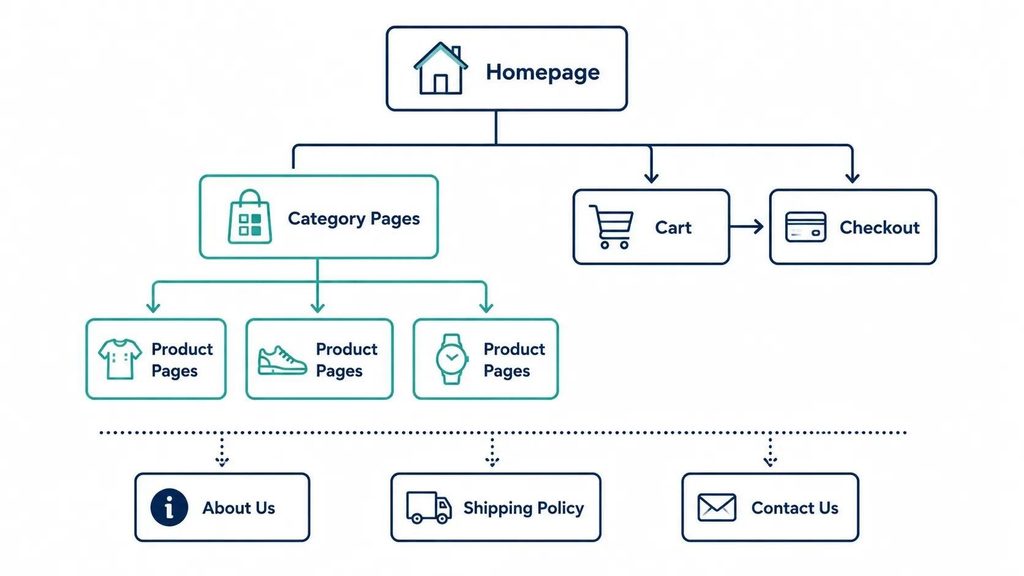
Homepage: Not a Product Catalog
The homepage should communicate what you sell, who it is for, and why someone should buy from you rather than a competitor, in that order. It is not the place to show every product. It is the place to build enough trust and clarity that the visitor moves deeper into the site.
Above the fold on the homepage: your value proposition in one sentence, a hero image or video that shows the product in use, and one primary call to action. Not three. One.
Category Pages: The Conversion Workhorse
Category pages are where most e-commerce SEO traffic lands, and where most purchase journeys actually begin. They need: a clear heading with the category keyword, robust filtering and sorting options, consistent product card design showing price and key attributes at a glance, and enough products per page to feel like a real selection without overwhelming choice.
Product Pages: Where the Decision Happens
Product pages need to answer every question a customer has before they are willing to add to cart. The essentials:
- Multiple high-quality images showing the product from different angles and in use
- A clear, specific title that matches what customers search for
- Price visible without scrolling, including any discounts and what they save
- Short, scannable description covering the key features and benefits
- Size guide, compatibility information, or specifications relevant to the product type
- Customer reviews: the number, the average rating, and a selection of actual review text
- Clear stock availability and estimated delivery timeframe
- Return and refund policy visible without leaving the page
Checkout: The Last Place to Introduce Friction
Cart abandonment rates average 70% across e-commerce globally (Baymard Institute, 2024). The majority of that abandonment happens in checkout. The most common causes: being forced to create an account, a checkout process with too many steps, unexpected shipping costs revealed late, and limited payment options.
A converting checkout offers: guest checkout as the default option, an address form that auto-completes, shipping costs visible before the checkout page, support for Apple Pay and Google Pay alongside credit cards, and a progress indicator showing how many steps remain.
What Technical Foundations Does a Converting E-Commerce Site Need?
A well-designed store on a slow, technically broken website will not convert. These are the technical fundamentals that separate a site that performs from one that looks good but loses sales. Many of these overlap with the broader web design and development standards that apply to any professional business site.
Mobile-First Design and Speed
Over 65% of e-commerce traffic in 2026 comes from mobile devices, and mobile conversion rates remain lower than desktop primarily because of poor mobile experiences, not because mobile users are less willing to buy. A site that loads in under 3 seconds on a mid-range phone on 4G and navigates cleanly on a 390px screen will consistently outperform a beautiful desktop site with a broken mobile experience.
Core Web Vitals
Google’s LCP, INP, and CLS metrics directly affect your search rankings. For e-commerce, CLS is particularly damaging: a product image that shifts as the page loads, or an add-to-cart button that jumps position, loses clicks at the exact moment of purchase intent. Passing all three Core Web Vitals is a baseline quality requirement for any e-commerce site competing in organic search.
SSL and Secure Checkout
Every page of an e-commerce site, not just the checkout page, should run on HTTPS. Google flags HTTP pages as Not Secure. More practically, a visitor who sees any security warning during a purchase journey will almost never complete the transaction.
Schema Markup for Products
Product schema markup tells Google the specific details of each product: price, availability, rating, review count. When implemented correctly, this enables rich results in search, showing star ratings and price directly in the search listing. These rich results consistently earn higher click-through rates than standard listings for the same ranking position.
How Do Trust Signals Affect E-Commerce Conversions?
A visitor who does not trust your site will not buy from it, regardless of how good the product is or how competitive the price. Trust signals address the specific anxieties a first-time buyer has when purchasing from an unfamiliar store.
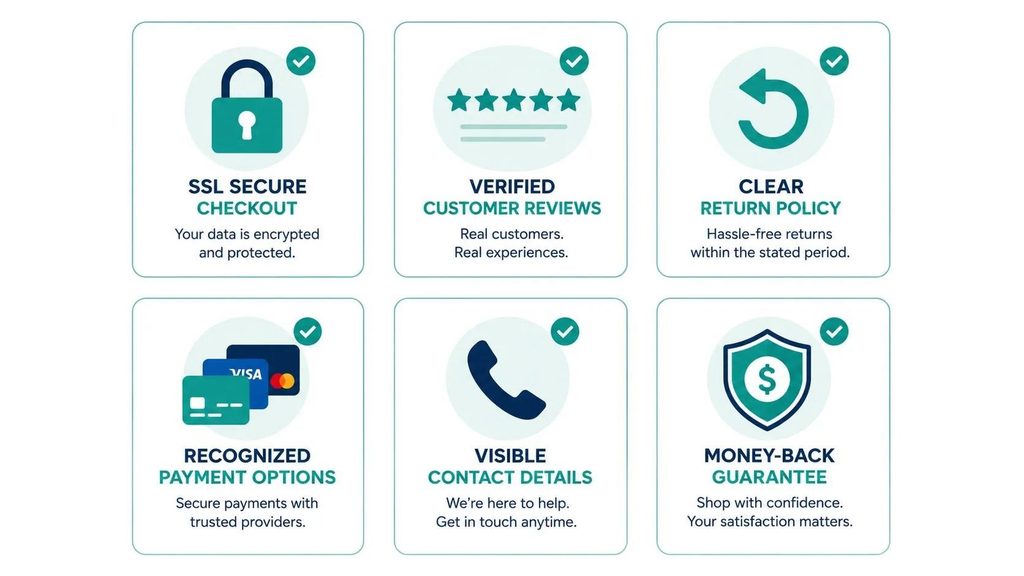
| Trust Signal | Where to Place It | Why It Works |
|---|---|---|
| SSL security badge | Checkout header and footer | Confirms payment data is encrypted |
| Payment method logos | Checkout page and footer | Familiar logos (Visa, Mastercard, PayPal, Apple Pay) reduce perceived risk |
| Customer reviews with photos | Product pages, homepage | Social proof from real people is more credible than brand copy |
| Clear return policy link | Product pages, cart, checkout | Removes the perceived risk of buying without seeing the product |
| Contact information (phone, email, chat) | Header and footer | Signals a real business is behind the store |
| Shipping timeframe and tracking | Product pages and order confirmation | Removes uncertainty about when the product arrives |
| ‘As seen in’ media mentions or certifications | Homepage and about page | Third-party credibility shortens the trust-building timeline |
How Do You Drive Traffic to a New E-Commerce Website?
A well-built store with no visitors generates no revenue. Traffic is a separate workstream from the build, and it is worth planning before launch rather than after.
- SEO: Product and category pages optimized for the keywords customers actually search. This is a long-term channel that takes 4-9 months to build meaningful traffic but produces the lowest cost-per-acquisition over time.
- Google Shopping Ads: Product listing ads that appear at the top of search results with product image, price, and rating. High intent, fast to launch, pay per click.
- Email marketing: Building a subscriber list from day one and emailing consistently is one of the highest-ROI channels for e-commerce, particularly for repeat purchase categories.
- Social commerce: Product tagging on Instagram and TikTok, and direct purchasing through social platforms, is a growing channel particularly for visually driven product categories.
- Content marketing: Buyer guides, comparison posts, and use-case articles that rank in search and drive high-intent traffic to category and product pages.
If you are building a mobile-first brand alongside your web store, a mobile app with push notifications can significantly increase repeat purchase rates from existing customers, typically outperforming email open rates for engaged audiences.
Frequently Asked Questions
How much does it cost to build an e-commerce website?
A Shopify or WooCommerce store built professionally costs $4,000-$15,000 depending on the number of products, custom design requirements, and integrations needed. This covers the store setup, theme customization or custom design, payment gateway configuration, and basic SEO setup. Ongoing monthly costs include platform fees ($39-$399/mo), hosting ($25-$100/mo for WooCommerce), and any paid apps or plugins.
How long does it take to build an e-commerce website?
A standard Shopify or WooCommerce store takes 4-8 weeks from kickoff to launch, assuming product content (images, descriptions, pricing) is provided in the first week. Stores with large product catalogs, custom functionality, or complex integrations take 8-16 weeks. The most common delay is product content: high-quality images and compelling descriptions take longer to produce than most business owners initially plan for.
What is the most important page on an e-commerce website?
Product pages drive the majority of conversion decisions, but category pages drive the majority of organic traffic. Both deserve significant design and content investment. If you have to prioritize, focus on category pages for SEO traffic acquisition and product pages for conversion rate optimization. A weak product page loses the sale even when the category page successfully attracts the right visitor.
Do I need a mobile app alongside my e-commerce website?
Not necessarily at launch, but it is worth planning for. A well-built mobile website on Shopify or WooCommerce handles most mobile purchase journeys adequately. A dedicated e-commerce mobile app makes sense when you have an established customer base with high repeat purchase rates, where push notifications and a faster native checkout experience meaningfully increase revenue. The typical threshold where an app investment pays off is around 1,000+ active monthly customers with a repeat purchase rate above 30%.
How do you reduce cart abandonment?
The most effective changes, in order of impact: enable guest checkout so registration is never required to purchase, show shipping costs on product pages rather than revealing them at checkout, send an automated cart abandonment email sequence starting one hour after the cart is left, add Apple Pay and Google Pay to reduce checkout friction on mobile, and simplify the checkout to the fewest possible steps. A checkout A/B testing program built into Shopify or via a WooCommerce plugin can identify which specific changes lift your conversion rate most.
An e-commerce website that converts is not significantly more expensive to build than one that does not. The difference is in the decisions: page structure, checkout friction, mobile experience, and trust signals. Get those right from the start and the platform almost does not matter.
Get them wrong and no amount of paid advertising spend will make the numbers work, because you are paying to send visitors to a store that loses them before they buy.
If you are planning an e-commerce build or want to improve conversion rates on an existing store, talk to TruTransit Solutions. We build stores that are designed to convert from the ground up, not optimized for conversions as an afterthought.