
Why Your Google Business Profile Isn’t Showing Up (And How to Fix It)

Google Business Profile (GBP) that is not showing up in search or Google Maps is almost always caused by one of six things: the listing has not been verified, it has been suspended for a policy violation, the business category is too broad or mismatched, the listing lacks enough reviews or activity to rank competitively, the searcher’s location is outside your service area, or there is a duplicate listing confusing Google. Most of these are fixable within a few days once you know which applies.
You set up your Google Business Profile, waited for the postcard, verified it, and now you search for your business and it does not appear. Or it appears when you search your exact business name but not for the service category you actually want to rank for.
Both situations are common and both are fixable. Here is a systematic walk through the most frequent causes, starting with the ones that affect the most businesses.
Is Your Google Business Profile Actually Verified?
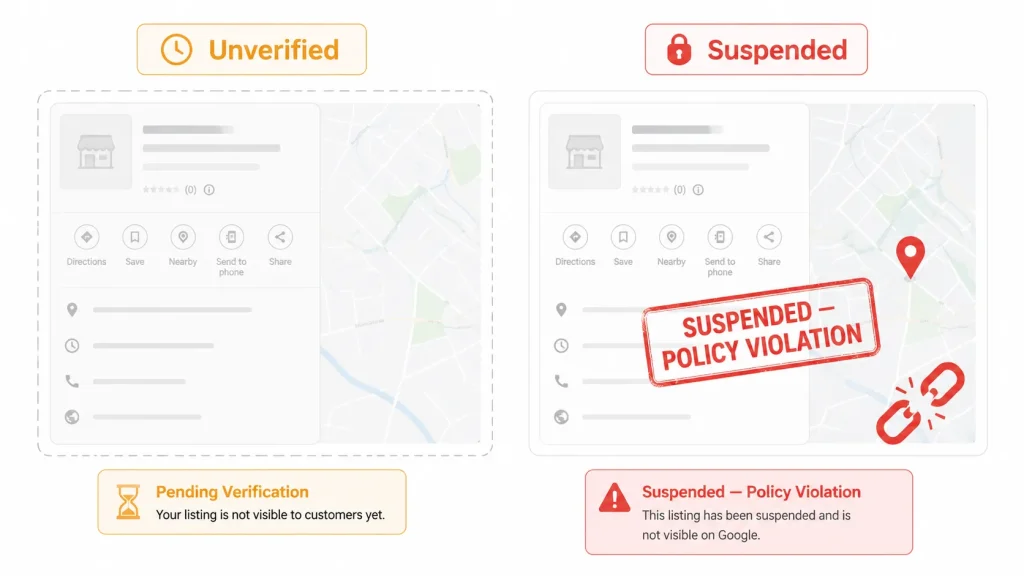
Verification is the most common reason a new GBP listing does not appear in search. An unverified listing is visible to you in the GBP dashboard but is not eligible to appear in Google Maps or the local search pack.
How to check: log into business.google.com and look at the status of your listing. If it shows a ‘Get verified’ prompt or an ‘Unverified’ badge, the verification process was not completed.
Google offers several verification methods depending on your business type:
- Postcard by mail: The standard method for most businesses. Google sends a postcard to your registered address with a 5-digit code. Takes 5-14 days. The postcard expires after 30 days.
- Phone or email: Available for some business types. Google calls or emails with a verification code.
- Video verification: Google may require a short video walkthrough showing your business location, signage, and operations. This became more common after 2023 to reduce fraudulent listings.
- Instant verification: Available if your business is already verified in Google Search Console with the same email address.
If your postcard never arrived, you can request a new one from the GBP dashboard. If you have been waiting more than 14 days, request a new code rather than waiting longer.
Has Your Listing Been Suspended?
A suspended listing is completely invisible in search and Maps, even to you in some cases. Google suspends listings that violate its guidelines, and suspension can happen to legitimate businesses, often without a clear notification.
Signs your listing may be suspended:
- You cannot find your listing when searching your exact business name on Google Maps
- You receive an email from Google saying your listing has been suspended or disabled
- When you log into GBP, you see a suspension notice or a request for more information
Common Reasons for Suspension
- Keyword stuffing in the business name: Adding keywords to your business name that are not part of your legal name (e.g., ‘Joe’s Plumbing Best Chicago Plumber 2026’) is a direct violation and common suspension cause.
- Incorrect business category: Listing a business in a category it does not genuinely belong to.
- Virtual office or shared address: Listing a coworking space, virtual office, or PO box as a business address when you do not operate from there.
- Multiple listings for the same location: Duplicate listings for the same business at the same address trigger automatic review.
- Recent bulk edits: Making many changes to a listing in a short period can trigger a manual review.
How to Reinstate a Suspended Listing
Go to business.google.com, find the suspended listing, and click ‘Appeal.’ You will need to provide documentation: a government-issued business license, a utility bill in the business name, or a lease agreement for the address. Google typically responds to reinstatement requests within 3-7 business days.
If you are unsure what caused the suspension, review Google’s Business Profile guidelines carefully before submitting an appeal. Reappealing with the same problem present will result in another suspension. A digital marketing specialist familiar with GBP can review the listing and identify the violation before you file the appeal.
Is Your Business Category Accurate and Specific Enough?
Google uses your primary business category as one of the core signals for which searches your listing should appear in. A category that is too broad, slightly wrong, or mismatched to your actual services limits your visibility for the searches that matter most.
Examples of category issues:
- A dental practice listed as ‘Health’ instead of ‘Dentist’ or ‘Dental Clinic’
- A web design agency listed as ‘Software Company’ instead of ‘Web Designer’ or ‘Marketing Agency’
- A pizza restaurant listed as ‘Restaurant’ instead of ‘Pizza Restaurant’ or ‘Italian Restaurant’
Fix: go to your GBP profile, edit the ‘Business category’ field, and search for the most specific category that accurately describes your primary service. You can add up to 9 secondary categories for additional services. The primary category carries the most ranking weight so choose it carefully.
Category optimization is one of the highest-impact single changes in local SEO. Switching from a generic category to the correct specific one has moved businesses from no map pack visibility to the top 3 within weeks. Your web design and digital presence decisions compound from here.
Does Your Listing Have Enough Reviews and Activity?
Google’s local ranking algorithm considers three main factors: relevance (does your listing match the search), distance (how close is your business to the searcher), and prominence (how well-known and active is your business online). Prominence is where reviews and listing activity come in.
A verified listing with zero reviews and no photos will rank below a competitor with 50 reviews, consistent photo updates, and regular Google Posts, even if the zero-review listing is closer to the searcher.
What signals activity and prominence to Google:
- A volume of recent, genuine customer reviews (2-3 new reviews per month consistently outperforms a one-time push)
- Regular Google Posts: updates, offers, events, or new services posted at least twice per month
- Photos added consistently: aim for at least one new photo per week
- Answered Q&A: respond to questions posed in the Q&A section of your profile
- Booking or messaging features enabled if relevant to your business type
None of these require significant time once you have a routine. Ten minutes per week of GBP activity, including responding to reviews and posting an update, produces measurable improvements in local ranking over 60-90 days.
Are There Duplicate Listings for Your Business?
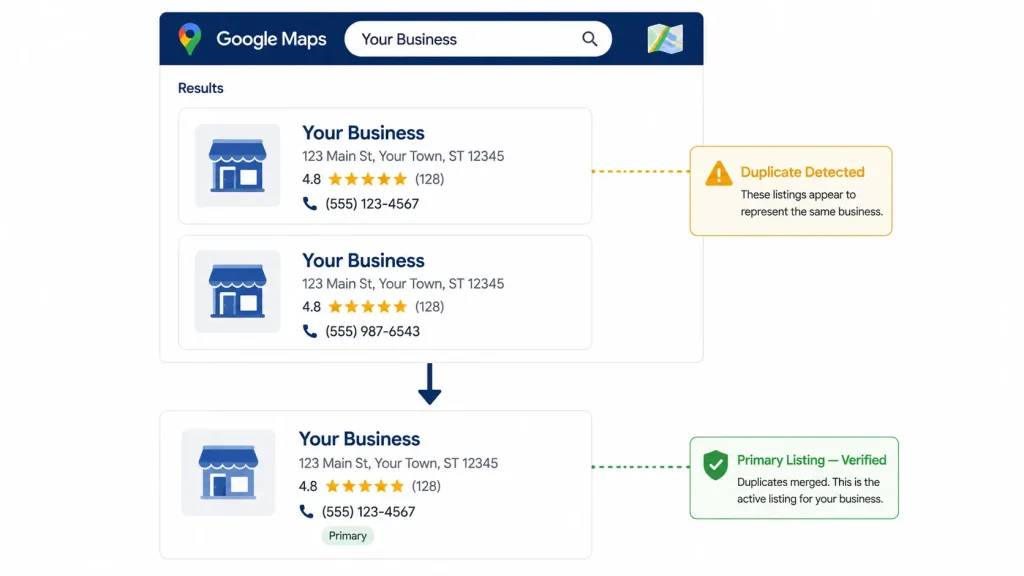
Duplicate GBP listings occur when a business has more than one listing at the same address. This can happen when a previous owner created a listing, when Google auto-generates listings from data it finds on the web, or when someone on your team created a second listing without knowing one already existed.
Duplicates confuse Google and split your review count and engagement signals across two listings instead of concentrating them on one. The result is often that neither listing ranks well.
How to find duplicates: search your business name and address on Google Maps. If more than one listing appears for the same location, you have a duplicate. Also check the GBP dashboard for any listings you do not recognize associated with your account.
How to fix it: for a duplicate you own, you can merge it with the primary listing through the GBP dashboard. For a duplicate you do not own (created by a previous owner or auto-generated), you can request ownership or flag it for removal through the GBP support process.
Is the Searcher’s Location Affecting What They See?
Google serves local results based on the searcher’s physical location at the time of the search. If someone searches for your business category from a neighborhood or city 10 miles away, your listing may not appear even if your GBP is perfectly optimized, because closer competitors take priority.
This is not a fixable problem in the traditional sense. It is how local search works. The solution is to make your listing so strong in all other factors (reviews, category accuracy, activity, website authority) that it appears even when distance is not in your favor.
You can expand your effective local reach by creating service-area pages on your website for the specific cities or neighborhoods you serve. These pages rank in organic local results even when the map pack defaults to closer competitors.
What Are the Other Reasons a GBP Listing Might Not Show Up?
| Issue | What It Looks Like | Fix |
|---|---|---|
| New listing in a competitive market | Listing shows for exact business name but not for category searches | Consistent review building, photo updates, and Google Posts over 60-90 days |
| Incorrect address format | Address on GBP does not match how Google Maps represents the location | Update address to match Google Maps exactly, including suite/unit format |
| Business hours not set | GBP shows no hours or ‘Hours not available’ | Add complete hours including holiday hours; Google deprioritizes listings without hours |
| Website URL mismatch | Website linked from GBP returns an error or redirects to a different domain | Update the website field in GBP to the correct current URL |
| Low profile completeness score | Multiple sections of the GBP are empty or minimal | Complete every available section: services, products, attributes, business description |
| GBP listing marked as permanently closed | A previous owner or auto-update marked the location closed | Claim the listing and update status to Open; may require re-verification |
Frequently Asked Questions
How long does it take for a Google Business Profile to show up after verification?
After successful verification, most GBP listings become visible in Google Maps and local search within 3-7 days. In some cases, particularly for new businesses in competitive markets or businesses that went through video verification, it can take up to 2 weeks. If your listing is still not visible after 2 weeks of verified status, check for duplicate listings or review the profile for any policy violations that might be triggering a manual review.
Can my competitors report my Google Business Profile?
Yes. Google allows users to suggest edits or report issues with any GBP listing. If a competitor reports your listing for a genuine guideline violation, Google may review and suspend it. This is more common than most business owners realize. The best protection is running a listing that is fully compliant with Google’s guidelines so that any reports can be appealed with documentation. Keyword-stuffed business names and inaccurate categories are the most frequently reported violations.
Why does my business show up in Google Maps but not in the local pack in search results?
The local pack (the 3 business listings that appear in regular Google search results) and Google Maps use the same underlying data but apply different ranking weights. The local pack is more competitive and considers additional signals like website authority and on-page local SEO. Being visible on Maps but not in the pack is common for businesses with solid GBP setups but weak website signals. Improving your website’s local SEO, including location pages and LocalBusiness schema, is the typical fix.
Does my website affect my Google Business Profile ranking?
Yes, directly. Google uses your website as a secondary signal to confirm and extend what your GBP says about your business. A website with consistent NAP data, local keyword relevance, and strong technical SEO improves your map pack rankings even when the changes are made on the website rather than the GBP itself. Businesses with no website consistently rank lower in local search than those with a functioning, optimized site.
What is the fastest way to improve Google Business Profile visibility?
In order of speed and impact: complete every section of your GBP profile (can show improvement in days), fix any category mismatches (1-2 weeks), start a consistent review acquisition process (30-60 days to see ranking movement), add 5-10 photos immediately and set a weekly photo routine (30 days), and publish Google Posts twice per week (60-90 days for consistent visibility improvement). Reviews are the single fastest lever for businesses that already have a complete, accurate listing.
A Google Business Profile that does not show up is not a mystery. It is almost always one of six fixable problems: unverified status, suspension, category mismatch, low activity and reviews, distance from searcher, or a duplicate listing. Whether you run a local service, an e-commerce business, or a mobile app-based service, GBP visibility follows the same rules.
Work through the list systematically, fix what applies, and check your GBP Insights weekly to confirm that profile views and search actions are trending up.
If you want someone to audit your GBP and identify exactly what is holding your listing back, get in touch with TruTransit Solutions. We review local presence as part of a broader digital marketing assessment and will tell you specifically what needs to change.