
Google Core Web Vitals Explained for Non-Technical Business Owners

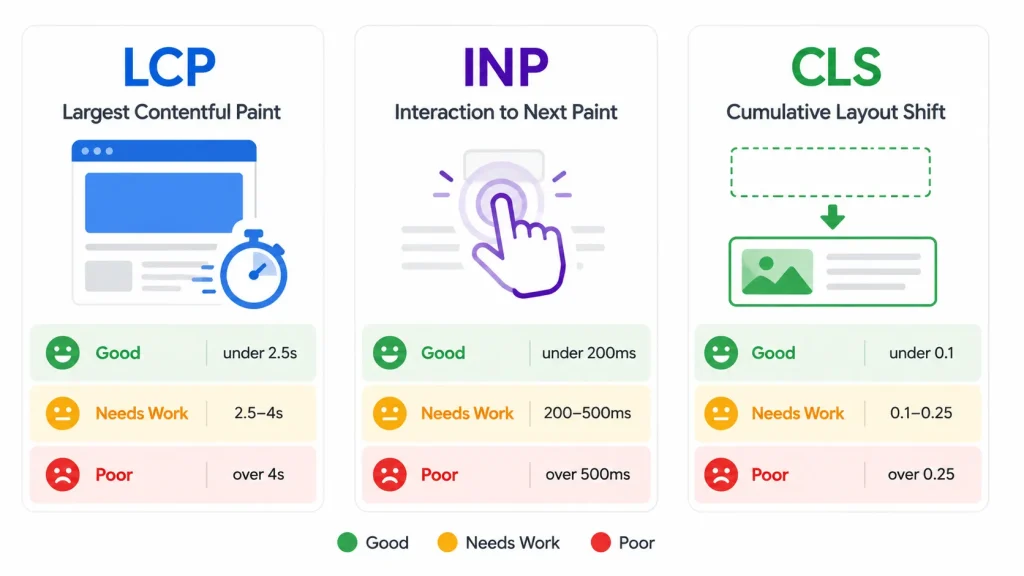
Core Web Vitals are three specific metrics Google uses to measure the real-world experience of using your website. They are: LCP (Largest Contentful Paint, how fast the main content loads), INP (Interaction to Next Paint, how quickly the page responds to clicks and taps), and CLS (Cumulative Layout Shift, how much the page jumps around while loading). Google uses these scores as a ranking signal. Pages that pass all three have a competitive advantage in search over those that do not.
When Google says it cares about ‘page experience,’ Core Web Vitals are the specific measurements it uses. They are not abstract quality signals. They are three numbers, each with a clear pass/fail threshold, that Google collects from real Chrome users visiting your site.
You do not need to understand the code behind them. You do need to know what they measure, whether your site passes, and who to talk to if it does not. Your web design and development team should be able to pull your scores immediately.
What Are the Three Core Web Vitals?
| Metric | What It Measures | Good Score | Needs Improvement | Poor Score |
|---|---|---|---|---|
| LCP — Largest Contentful Paint | How long until the largest visible element (usually a hero image or headline) fully loads | Under 2.5 seconds | 2.5 to 4.0 seconds | Over 4.0 seconds |
| INP — Interaction to Next Paint | How fast the page responds after a user clicks, taps, or presses a key | Under 200ms | 200 to 500ms | Over 500ms |
| CLS — Cumulative Layout Shift | How much the page content shifts or jumps around while it is loading | Under 0.1 | 0.1 to 0.25 | Over 0.25 |
Google collects these scores from real Chrome users, not from lab tests. This means your scores reflect actual visitor experiences, including people on slow connections and older devices. A site that passes in a developer’s testing environment on a fast Mac can still fail in real-world field data.
What Is LCP and Why Does It Matter?
LCP measures how quickly the main content of a page becomes visible to the user. It is not the first thing that loads; it is the largest piece of visible content. For most small business websites, that is the hero image at the top of the homepage or the main headline.
A slow LCP tells the visitor that the page is not ready yet. Research from Google found that as page load time increases from 1 second to 3 seconds, the probability of a visitor leaving before the page loads increases by 32%. LCP is the metric most directly tied to that abandonment behavior.
What Causes a Poor LCP Score?
- Uncompressed hero images: A homepage hero image saved at 3MB instead of 150KB is the single most common LCP failure on small business sites
- Slow server response time: If the server takes over 600ms to begin sending data, LCP cannot be fast regardless of what else is optimized
- Render-blocking resources: CSS or JavaScript files that must fully load before the browser can display any content
- No lazy loading on above-the-fold content: Paradoxically, lazy-loading the hero image delays LCP. That image should load eagerly, with lazy loading applied to images further down the page
What Is INP and How Is It Different from the Old FID Metric?
INP replaced FID (First Input Delay) as a Core Web Vital in March 2024. FID measured only the delay before the first user interaction. INP measures the delay for all interactions throughout the entire page visit, which makes it a more comprehensive measure of how responsive a page feels during normal use.
If a user clicks a button on your website and nothing visibly happens for half a second, that is a poor INP. For most static business websites, INP scores are naturally good because there is not much interactive JavaScript running. INP becomes a problem on pages with heavy front-end frameworks, real-time data fetching, or complex form logic.
What Causes a Poor INP Score?
- Long JavaScript tasks blocking the main thread: JavaScript that runs for more than 50ms without a break blocks the browser from responding to user input
- Third-party scripts: Analytics, chat widgets, advertising scripts, and tracking pixels all run on the main thread and compete for processing time
- Unoptimized event handlers: Complex functions triggered by clicks or form inputs that do too much work before returning control to the browser
For most small business sites on WordPress with standard themes, INP is rarely the primary issue. Where it becomes significant is on e-commerce sites with heavy product filtering, cart interactions, and checkout flows that involve substantial real-time JavaScript.
What Is CLS and Why Does a Jumping Page Hurt Rankings?
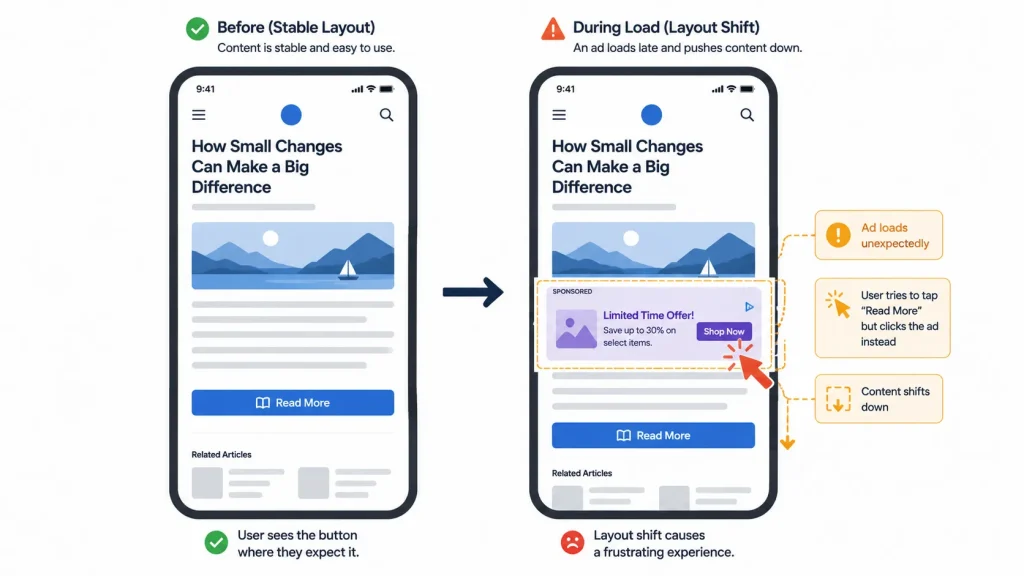
CLS measures visual instability: how much the page layout shifts while loading. If you have ever tried to click a button and the page jumped at the last second so you tapped something else, you have experienced a high CLS.
Google cares about CLS because it directly affects the user’s ability to interact with the page confidently. A page that keeps shifting while loading trains visitors to hesitate before clicking anything.
What Causes a Poor CLS Score?
- Images without defined dimensions: When an image loads without a set width and height in the HTML, the browser does not reserve space for it. Everything below shifts down when the image appears.
- Ads or embeds that load after content: A Google Ad or embedded video that loads 2 seconds after the page renders pushes all the content below it down.
- Web fonts loading late: A font that swaps in after the page first renders causes text to reflow if the new font has different spacing.
- Dynamic content injected at the top: Cookie banners, notification bars, or promotional strips inserted above the content after initial render cause significant layout shift.
How Do You Check Your Core Web Vitals Scores?
Four tools give you the most useful picture, and all are free:
| Tool | Where to Find It | What It Shows | Best Used For |
|---|---|---|---|
| Google Search Console | search.google.com/search-console | Real-world field data from Chrome users; pages grouped by Pass/Needs Improvement/Poor | Understanding actual ranking impact across your whole site |
| PageSpeed Insights | pagespeed.web.dev | Both lab data (controlled test) and field data (real users); specific recommendations per metric | Diagnosing a specific page and getting fix recommendations |
| Chrome DevTools | F12 in Chrome > Performance or Lighthouse tab | Detailed lab test with waterfall view showing exactly what loads when | Developer-level diagnosis of specific performance bottlenecks |
| CrUX Dashboard (Chrome UX Report) | Via Google Data Studio or Search Console | Historical field data trends over time by URL and country | Tracking whether fixes improved real-world scores over weeks |
Start with Google Search Console. Go to Experience > Core Web Vitals and look at the ‘Poor URLs’ list first. These are the pages actively harming your rankings. Then use PageSpeed Insights on your homepage and your highest-traffic service pages to get specific fix recommendations.
Do Core Web Vitals Directly Affect Google Search Rankings?
Yes, but as one factor among many. Google confirmed that Core Web Vitals are a ranking signal as part of its Page Experience update, which rolled out in 2021 and was updated to include INP in 2024.
The practical weight of Core Web Vitals in rankings varies by situation:
- For two pages with similar content quality and backlink profiles, the one with better Core Web Vitals will rank higher
- For a page with significantly better content than competitors, a poor Core Web Vitals score will not eliminate its rankings but it does act as a ceiling
- For local search and map pack rankings, Core Web Vitals affect the website link click experience more than the GBP listing rank itself
Think of Core Web Vitals as the floor, not the ceiling. Failing them limits how high your pages can rank. Passing them does not guarantee top rankings, but it removes a barrier. For a small business website competing in a specific geographic market, passing Core Web Vitals while most local competitors fail them is a genuine ranking advantage.
How Do You Improve Core Web Vitals Without Being a Developer?
The highest-impact fixes for most small business sites are manageable without advanced technical knowledge, especially if the site is on WordPress.
Fixes You Can Do Yourself
- Compress all images: Install ShortPixel or Imagify on WordPress and run bulk compression. This alone fixes LCP on most sites with large hero images.
- Install a caching plugin: WP Rocket or W3 Total Cache reduces server response time and improves LCP significantly.
- Add image dimensions in HTML: If your theme does not set image width and height attributes automatically, this is a one-line fix per image that eliminates most CLS failures.
- Defer non-critical JavaScript: Most caching plugins have a setting to defer JS. Enable it and test that nothing breaks visually.
Fixes That Require a Developer
- Eliminating render-blocking resources requires modifying how CSS and JS are loaded, which typically needs theme-level changes
- Optimizing third-party script loading (analytics, chat, ads) requires technical knowledge of async/defer attributes and tag manager configuration
- Improving server response time may require switching hosting, configuring a CDN, or implementing server-side caching beyond what plugins offer
- Fixing complex CLS issues caused by ad networks or late-loading embeds requires JavaScript-level changes to how content is inserted into the DOM
If your PageSpeed Insights mobile score is below 50 and the issues listed are mostly in the ‘Opportunities’ section rather than the ‘Passed’ section, the fixes are in developer territory. A web development team familiar with performance optimization can typically move a failing site to passing in one focused engagement.
Frequently Asked Questions
Do Core Web Vitals matter more for mobile or desktop?
Mobile. Google uses mobile-first indexing, which means it evaluates your mobile page experience for ranking purposes, not your desktop version. Your PageSpeed Insights mobile score and Core Web Vitals mobile data in Search Console are what matter most for SEO impact. Many sites have good desktop scores and poor mobile scores because images, fonts, and scripts were not optimized for slower mobile connections and less powerful processors.
If I pass Core Web Vitals, will my site jump to page one?
Not on its own. Core Web Vitals are one signal in a ranking algorithm with hundreds of factors. Passing them removes a negative signal and gives you a competitive edge over similar pages that do not pass. To rank on page one, you also need content relevance, backlink authority, on-page SEO, and business-specific factors like Google Business Profile strength for local searches. Core Web Vitals are necessary but not sufficient for top rankings.
How often does Google update Core Web Vitals?
Google has updated the Core Web Vitals set twice since launch: once in 2022 when it refined the LCP calculation, and again in March 2024 when INP replaced FID. Google signals changes well in advance, typically announcing updates 6-12 months before they take effect. Following the Google Search Central blog is the most reliable way to stay current.
What is a good PageSpeed Insights score?
Google’s scoring system rates pages as Good (90-100), Needs Improvement (50-89), or Poor (0-49). For most small business websites, a mobile score above 70 is the practical target and is achievable without a full rebuild. Scores above 90 on mobile typically require significant development investment and are more relevant for high-traffic e-commerce or content sites where page speed directly affects revenue at scale.
Can my Core Web Vitals score change without me doing anything?
Yes, in both directions. Your scores are based on real Chrome user data from the previous 28 days. If you add a new plugin that loads additional JavaScript, your INP score can worsen. If a CDN your site uses gets faster, your LCP may improve. Third-party embeds (YouTube videos, social widgets, booking calendars) can degrade CLS or INP scores when those external services change how they load. Checking your Search Console Core Web Vitals report monthly catches degradations before they compound.
Core Web Vitals are not a technical obstacle to clear once and forget. They are an ongoing measurement of how well your site serves real visitors on real devices. They affect your digital marketing performance directly, and for businesses with mobile apps alongside their website, the same performance principles apply to the app experience.
The practical approach: check your Search Console Core Web Vitals report now, fix the poor-scoring pages in order of traffic volume, and set a monthly reminder to check for new issues. Most small business sites can pass all three metrics with a focused one-time effort and a quarterly maintenance habit.
If you want to know your current scores and what fixing them would actually involve for your specific site, talk to TruTransit Solutions. We assess performance as part of every web project and can tell you whether your issues are in the DIY category or need developer attention.